
URL: https://youtap.atlassian.net/
Access: Using your @youtap.com email address.
Help/Admin: @Unknown user
Jira is used for all development tasks as a means of describing the activity that needs to happen, and to track the process. All development tasks need to be in Jira, and will be linked to PR in Github.
Jira Projects
Jira Projects are organised by the functional area of the development tasks. The main projects are described below, along with what they are used for:
|
Key |
Name |
|
|---|---|---|
|
ADP |
Admin Portal |
The admin portal for managing wallet administration (e.g. https://admin.domain.com) |
|
CA2 |
Consumer App v2 |
The Wallet Consumer App itself. Does not include tickets for API changes in the backend. |
|
CWL |
Consumer Wallet Lite |
One NZ (nee Vodafone)'s web reward wallet. |
|
CMS |
Customer Management System |
The CMS portal for clients to manager their customers (e.g. https://cms.domain.com) |
|
DAT |
Database |
Changes to the Database / Data Persistence Layer |
|
EMF |
Embedded Finance Module |
Fineract/Mifos system used to do savings and loan accounts. |
|
MA3 |
Merchant App v3 |
Merchant App, used to accept payments. |
|
PRSD |
Pre-Release Support Desk |
Service Desk project for clients to raise pre-release issues (e.g. during UAT) |
|
PRDSUP |
Production Support Service Desk |
Service Desk project for clients to raise production issues |
|
RPS |
Retail Promotions System |
The systems to support the loyalty service. This includes the new One NZ loyalty system and the campaign manager. |
|
SSV |
Spring Services |
The main back end project. Any changes that need to happen for generic (i.e. not RPS) APIs and services. |
|
TDOC |
Technical Documentation |
Documentation requests. |
|
YC |
Youtap Discovery |
Ideas and future features. |
Ticket Types
|
Ticket Type |
When to use |
|---|---|
|
Bug |
When something is not behaving as expected |
|
Improvement |
Minor update to an existing feature |
|
Feature / Story (depends on project) |
A new feature / or part of a new feature (linked by an epic) |
|
Epic |
Grouping of related tickets. Used for example for a new feature that has multiple pieces of work. Can contain tickets from multiple projects. |
|
Sub-Task |
Used to breakdown a Feature/Story into subtasks when needed. Should be avoided.
|
|
Task |
A non-development task that is being tracked in Jira |
|
Test |
A testing only task with no development. |
Jira Workflows
The Jira workflow used for each project is the following:
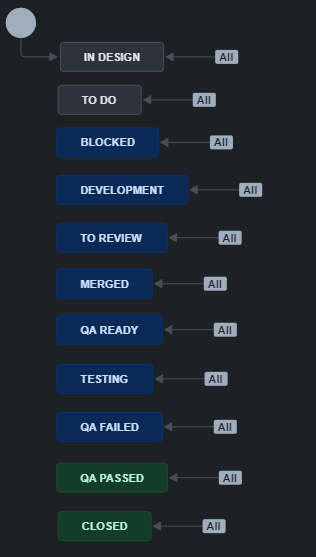
|
State |
Normally Assigned To |
Activities |
Normal Next State |
|---|---|---|---|
|
In Design |
Product / BA |
Ticket is being refined / Design is still being done Doesn’t apply to Bugs |
To Do |
|
To Do |
Unassigned / Developer |
This ticket is ready to be picked up by a developer (once it’s in a sprint). It can either be unassigned, or already allocated to a developer. |
Development |
|
Blocked |
Developer / QA |
This ticket can’t be worked on because of another issue. |
To Do / Development / QA Ready |
|
Development |
Developer |
This ticket is being actively worked on by a developer. |
To Review |
|
To Review |
Developer |
The ticket is waiting for developer review. |
Merged |
|
Merged |
Developer |
The ticket has passed reviewed, and has been merged into the appropriate branch |
QA Ready |
|
QA Ready |
Unassigned / QA |
The ticket is in a branch that has been deployed to a QA environment. |
Testing |
|
Testing |
QA |
This ticket is actively being tested by QA |
QA Passed |
|
QA Failed |
Unassigned / Developer |
This ticket failed QA, and is ready to be picked up by the developer again |
Development |
|
QA Passed |
Unassigned |
This ticket passed QA and can be included in a deployment |
Closed |
|
Closed |
Unassigned |
This ticket has been deployed. |
|
Requirements for Jira Tickets
Do’s and Do Not’s of Jira
-
Do not set up excessive automation. These automation triggers count towards a limit, and if we reach it, the other automation will not work.
-
Do make sure tickets are moved to the correct workflow status (e.g. when you start working on a ticket move To Do → Development, and make sure to move to To Review when waiting for a review)
-
Do not commit work without linking to a Jira ticket.
-
Do not assign tickets to yourself (or other people) if you aren’t going to work on it immediately. Allow someone else to pick it up if needed.
-
Do not create excessive sub-task tickets. It’s okay to have multiple commits for a single ticket.
-
Do make sure you have a profile picture assigned to your profile, and your name is correct.
-
Do not move tickets between sprints. That is for the Product Owner to do.
-
Do make sure you add relevant comments to tickets (e.g. you had a discussion on the ticket IRL or on teams, and it has relevant information that would be useful to anyone working on or reviewing the ticket)
-
Do make sure tickets are in the correct project. Tickets can be moved if they need to be (e.g. a bug was thought to be in the app, but is in the BE).
-
Do not create more projects in Jira, even team-managed projects.
-
Do not add Jira plugins / apps /add-ins.