Capacity planning for squads is done using an Excel workbook - Squad Capacity and Velocity - YTTI.xlsx
Capacity planning means working out how many story points a squad should be able to achieve in a given sprint. This is known as the velocity.
This is calculated using the known squad member availability (taking into account any public holidays, annual leave, and commitments outside the team), and the amount of story points achieved by the squad in previous sprints.
This is all calculated in the spreadsheet and the details are just provided here for reference.
Specifically, the calculation is
We don't have a way to export this macro.
What this means, is the velocity for the current sprint, is calculated by taking the current squad availability (C) multiplying it by the amount of time (on average) a developer spends of their working week on squad tasks, multiplied by the average (over the last three sprints) of the number of points achieved by squad resource day. In other words, multiple the number of points achieved per day by the number of days available.
Using the Capacity Planning Spreadsheet
The spreadsheet takes a few inputs (squad availability, past sprint performance) and outputs the projected velocity for future sprints.
Entering Squad Availability
Squad availability is entered on the ‘Capacity and Leave’ tab. The idea is to take into account planned leave, public holidays, other commitments, and efficiency when calculating how many story points a team should commit team.
This sheet is broken into these main components:
-
Squads - Cols B-E contain the squad information.
-
Sprints - Cols E+ contain sprints. Each sprint has 16 columns, one for allocation (\%), 14 for each day in the two weeks, and one for the Capacity (Cap). Each sprint for each team has a projected capacity (bottom right of each squad’s sprint)
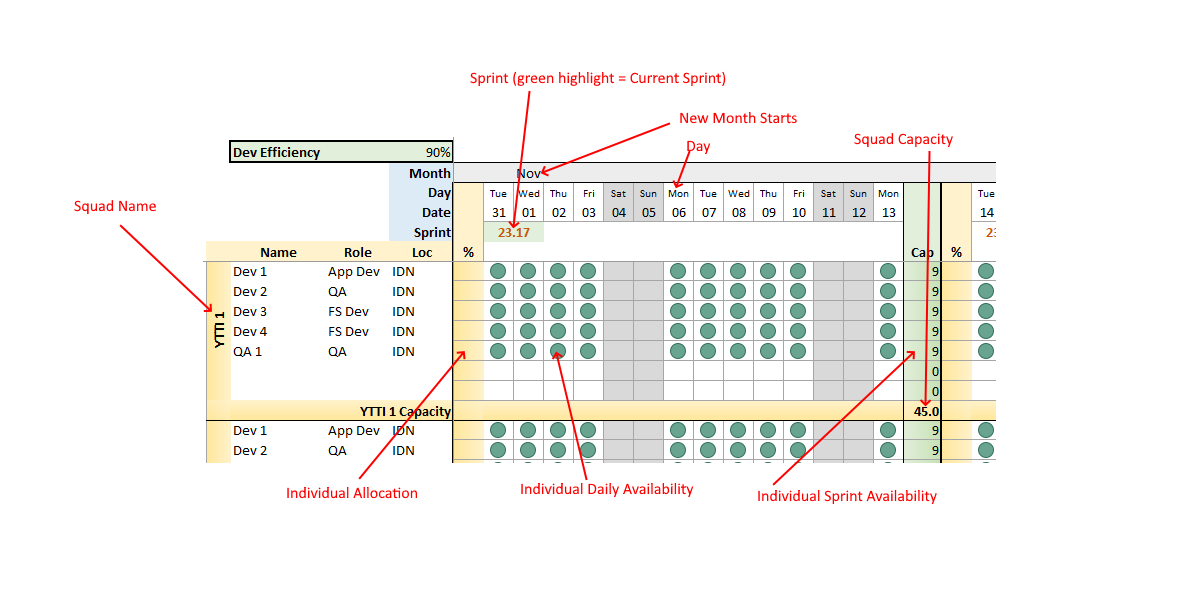
Dev Efficiency - This is an overall percentage of how much time a squad member sprints on sprint tasks. It changes every calculation (i.e. every sprint for every team), so should not be changed. It’s sent to 90% with the idea that the other 10% of a squad members time is used for company tasks (e.g. company meetings), HR (e.g. perf evaluations) and ad-hoc training.
Squad Members - Only squad members that contribute to points in a squad should be included in the sheet. So this means that Scrum Masters, Business Analysts and Product Owners should not be listed. The squad members Name, Role and Location are listed (location is useful for public holidays)
Squad Member Allocation - The first column (\%) of each sprint is for how much a squad member is available to work within the squad. If not entered, this defaults to 100%. This is used for people who are split between multiple squads (should only be done if absolutely necessary) or if the team member has responsibilities outside the squad.
Squad Member Daily Availability - For each day in a sprint, the team members availability is entered. This should be set to 1 if they are available (as normal for weekdays), 0 if they are not available (on leave, public holiday, other non-squad commitment (e.g. training). It can also be set to a value between 0 and 1 if they are partially available (e.g. half day leave). This should not be adjusted after the sprint has started (e.g. don’t enter sick leave, etc). Public holidays should have already been entered. The sheet translates 0 to green circles, 1 to red circles, and anything in between to orange circles.
Entered Past Squad Velocity
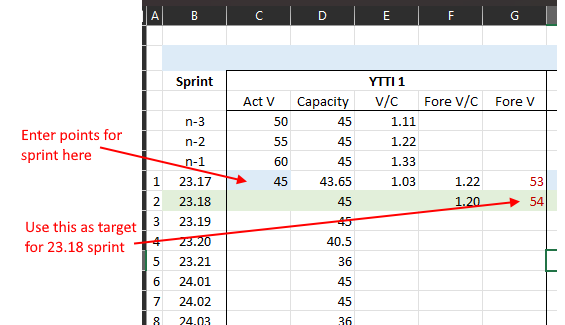
On the ‘Squad Velocity Tables’ sheet, the squads past velocity is entered.
The sheet has five columns for each squad, with a row per sprint (sprints labelled n-1, n-2,n-3 are used at the start to calculated an initial velocity)
Act V - This is where the actual points achieved in a sprint are entered after the sprint has finished.
Capacity - The availability for the squad for each sprint. This is pulled from the Capacity & Leave sheet.
V/C - Actual Velocity / Capacity. This number is the number of points achieved in a sprint per available day.
Fore V/C - The forecast points per available day for the sprint. This is calculated as the average of the previous three V/C.
Fore V - This is the output field. It uses the forecast capacity and forecast V/C to show the target points for a given sprint.